Analyze with ipynb
New in ScopeFoundry 2.0
This feature works best with Jupyter Notebook installed. We recommend the following steps:
- Install Visual Studio Code.
- Install the following extensions:
- Pylance (Microsoft)
- Jupyter (Microsoft)
New in ScopeFoundry 2.2: We recommend to trigger this feature after a success-full measurement as a new cell that loads the latest measurement is appended to the notebook.
Trigger Feature
Note: In some versions of VS Code the data folder has to be opened explicitly (File -> Open Folder …) for this feature to work.
There are two ways to trigger this feature:
In the app
Click corresponding button on bottom left of the app
or
navigate to Advanced -> Analyze with ipynb. The folder acted upon is the one defined in the app/save_dir settings (bottom left panel).
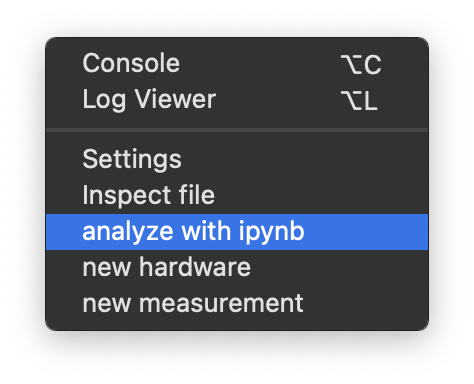
Without the app
Using ScopeFoundry tools (install instructions here), navigate to your "to/your_folder_with_data" and if necessary activate scopefoundry
Then run the following command:
python -m ScopeFoundry.tools
Click the button on the Welcome tab to proceed.
or with 2.3
python -m ScopeFoundry ipynb-XX
# (where XX is 'all', 'last' or 'remaining')
where XX can be last (default) all, or remaining.
Result
This feature generates the following:
- An
h5_data_loaders.pyfile containing convenience methods based on the contents of the.h5files. - An
overview.ipynbfile where you can start your analysis.

In the notebook, the top two cells are generated:
CELL #0: Imports the data loaders.Cell #1: Commands to load files in the folder.
Re-triggering
After adding more data-files to the folder, it is generally safe to re-trigger this feature to update CELL #1 and add more loaders. However, the following caveats apply:
CELL #0will be overwritten: All changes will be lost.- Content of
CELL #1will never be deleted. Lines that do not already exist fuzzily will be added. For example, a line that has been commented will not be added again. - Cells onwards are not altered. New in Version 2.2: re-triggering appends a new cell with a line that loads the latest file.
Clean up data folder
New in ScopeFoundry 2.3
Suppose that only the files mentioned in the overview.ipynb are going to be useful, you can run
loaders.